



Document Insights:
AI-Powered Legal Document Analysis

Upload contracts, pleadings, or discovery documents. Get instant summaries, risk flags, and key term extraction powered by legal AI.

ISO 27001 certified information security management systemISO 27001 Certified
GDPR compliant data protection and privacy standardsGDPR Compliant
HIPAA compliant security for sensitive legal and health dataHIPAA Compliant
SOC 2 Type II certified security and compliance controlsType II Certified

Trusted By US Litigators & Trial Teams.

At the world’s top firm

Mayer LLP
Morgan Lewis Bockius
Piper Alderman
Shearn Delamore
Southern Arizona Legal Aid
Will M. Helixon
K&L Gates
Mayer LLP
Morgan Lewis Bockius
Piper Alderman
Shearn Delamore
Southern Arizona Legal Aid
Will M. Helixon
K&L Gates

How NexLaw’s
Document Insights Feature Works

Our AI-powered document analysis reads your files the way a senior attorney would —
but 100x faster.

1

Upload Your Documents

Drag and drop contracts, pleadings, discovery documents, or any PDF. Our OCR handles scanned documents too.

2

AI Analyzes Content

NexLaw’s legal AI extracts key terms, identifies risks, categorizes clauses, and summarizes obligations.

3

Review & Export Insights

Get organized analysis with extracted terms, identified risks, clause categorization, and summaries in an easy-to-navigate interface.
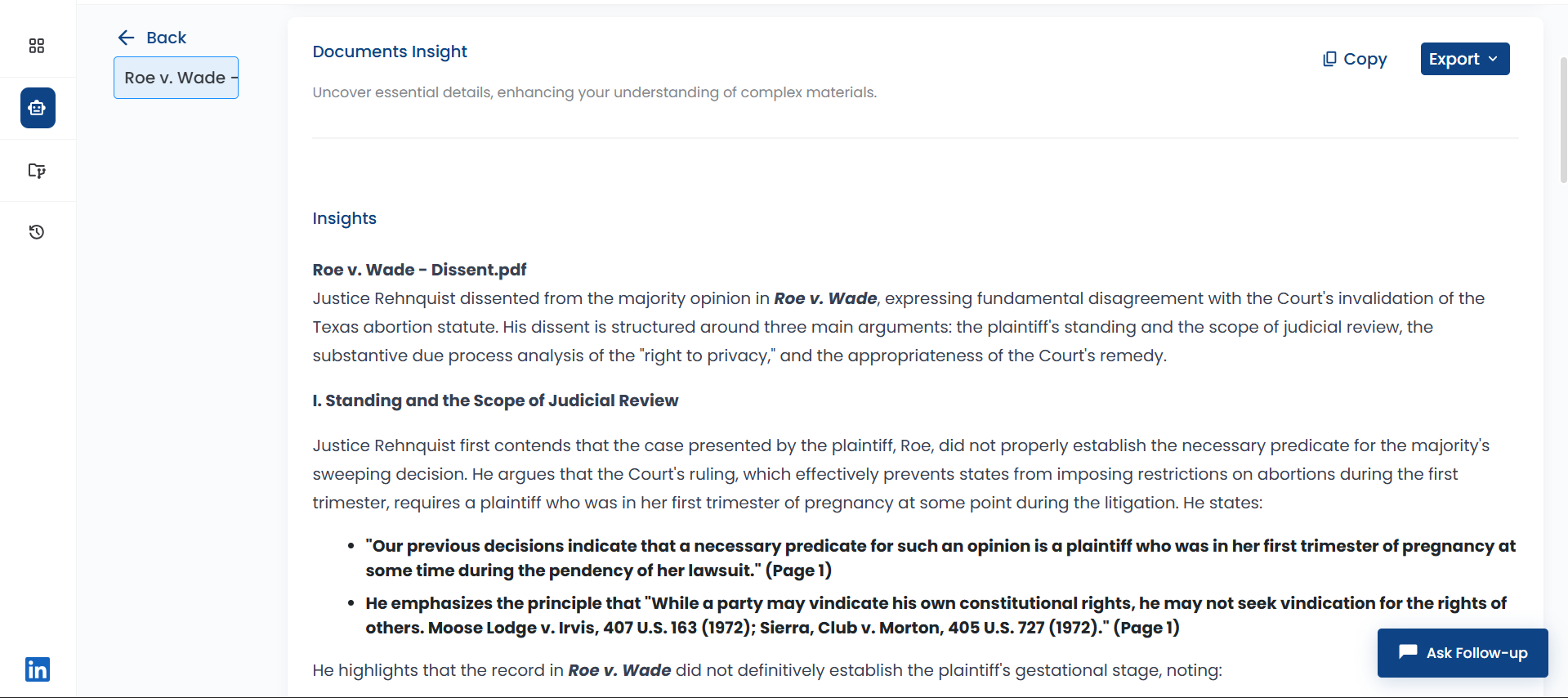
NexLaw Document Insights Dashboard

Why Litigators Choose NexLaw
for Document Analysis

Stop drowning in documents. Get instant insights that matter.

Lightning Fast Analysis

Analyze 1000+ page documents in under 2 minutes. No more all-nighters reviewing discovery.

Risk Detection

AI flags potential issues, unfavorable terms, and missing clauses before they become problems.

Smart Extraction

Automatically extract parties, dates, obligations, and key terms with legal context understanding.

Batch Processing

Upload entire folders and get cross-document insights, comparisons, and consolidated summaries.

Export Ready

Download analysis to Word, PDF, or Excel. Perfect for client reports and case memos.

Secure & Confidential

SOC 2 compliant, attorney-client privilege protected. Your documents never train our AI.

Will M. Helixon profile photo
" After 31 years in military law and 150+ jury trials, I approached NexLaw with healthy skepticism. The platform exceeded my high expectations fundamentally changing how my team approaches research and case preparation. The CasePrep feature has become indispensable, elevating our trial readiness to new heights. "
Will M. Helixon
Founder & Attorney, Military Law Specialist
Law Office of Will M. Helixon

Ready to Analyze Documents 100x Faster?

Join 500+ litigators who trust NexLaw for document analysis.


Schedule Demo

Start Free Trial

Related Features

Explore Related NexLaw Features

Legal Research

Find relevant case law in seconds with AI-powered research.

Learn More

Find Precedents

Search millions of cases to find the perfect precedent.

Learn More

Draft a Legal Memo

Generate structured memos with citations and analysis.

Learn More

FAQ

Frequently Asked Questions

Explore answers to frequently asked questions about Nexlaw

1. How does AI summarize legal documents?

AI summarizes legal documents by extracting key facts, dates, parties, obligations, and legal issues from contracts, pleadings, discovery, and case files. NexLaw's document insights tool analyzes thousands of pages in minutes, creating structured summaries that highlight important clauses, flag risks, and identify actionable information. Legal teams use AI summarization to accelerate document review, prepare for depositions, and understand complex case materials without reading every page manually.

2. Who should use NexLaw’s Document Insights feature?

This feature is ideal for lawyers, legal teams, and law firms that regularly review contracts, agreements, pleadings, and other legal documents.

3. How does Document Insights work?

NexLaw analyses uploaded legal documents and surfaces key points, summaries, and notable sections, allowing lawyers to understand documents faster without reading every page manually.

4. Can Document Insights help identify legal risks and issues?

Yes. Document Insights assists in highlighting potential risks, obligations, and unusual clauses, supporting more informed legal review and decision-making.

5. Does Document Insights replace manual document review?

No. It is a support tool, not a replacement for legal judgement. Lawyers should always review and validate insights before relying on them.

6. What types of documents can be analysed with Document Insights?

The feature can be used on contracts, agreements, court filings, legal correspondence, and other legal documents, making it suitable for various practice areas.

7. Is my document data secure on NexLaw?

Yes. NexLaw applies enterprise-grade security measures to protect sensitive legal documents and maintain confidentiality.

8. How does Document Insights improve legal productivity?

By reducing time spent reviewing lengthy documents, NexLaw helps lawyers focus on analysis, strategy, and client advice.

9. Is Document Insights suitable for solo practitioners and law firms?

Yes. NexLaw supports solo practitioners, small firms, and larger legal teams with scalable AI-powered document analysis.

NEXLAW AI