Turn Legal Documents Into Organized
Case Timelines — Automatically
Stop spending days building chronologies manually. NexLaw's AI extracts dates, facts, and events from your case files and creates trial-ready timelines in minutes.
 ISO 27001 Certified
 GDPR Compliant
 HIPAA Compliant
 Type II Certified
Trusted By US Litigators & Trial Teams.
At the world’s top firm














How NexLaw’s Case Chronology Feature Works
Our AI-powered chronology builder reads your case files the way a senior attorney would —
but 100x faster.
1
Upload Your Documents
Drag and drop depositions, medical records, police reports, emails, or any PDF. Our OCR handles scanned documents too. You can summarize discovery documents before adding them to your timeline for maximum efficiency.
2
AI Extracts Key Events
NexLaw’s legal AI identifies dates, parties, actions, and facts. It understands legal context — not just keywords.
3
Export Your Timeline
Receive organized analysis with extracted terms, identified risks, clause categorization, and obligation summaries in an easy-to-navigate interface.
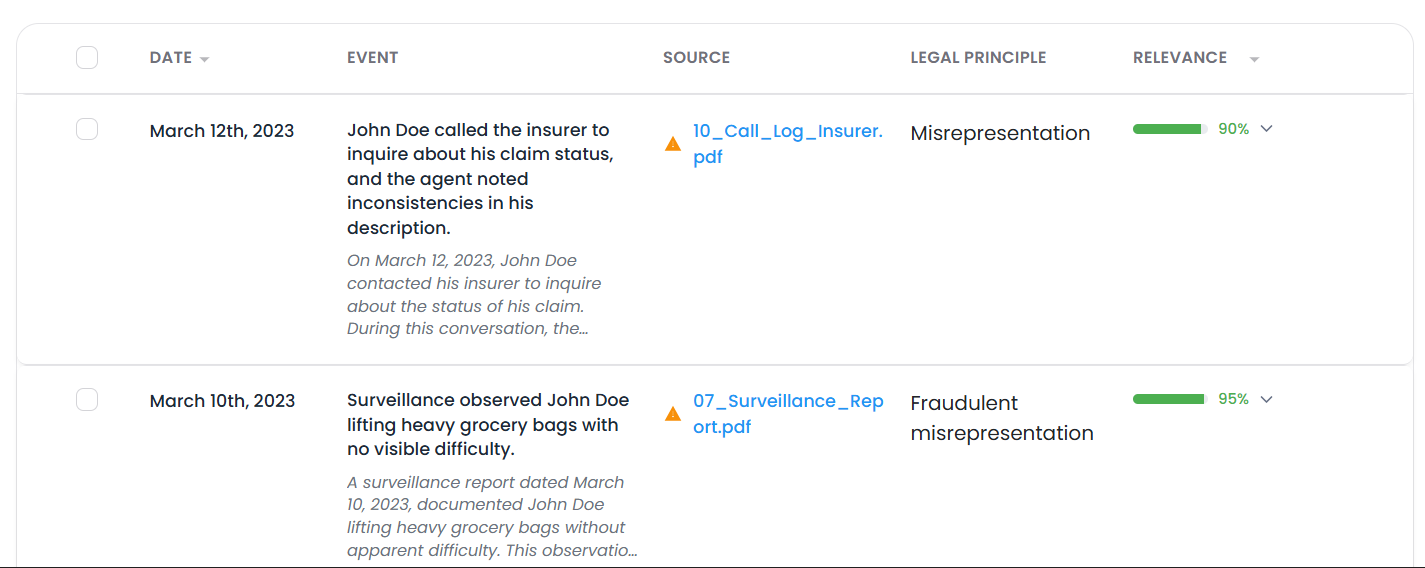
Why Firms Choose NexLaw for Case Chronologies
10x Faster Than Manual Methods
What used to take 2-3 days now takes 20 minutes. Free up your team to focus on strategy, not data entry.
Never Miss a Critical Date
Our AI catches events human eyes skip. It cross-references multiple documents to ensure completeness.
Trial-Ready Formatting
Export chronologies formatted exactly how judges and juries expect to see them — with page/line citations included.
Update in Real-Time
New deposition comes in? Upload it, and we’ll automatically integrate new facts into your existing timeline.
Built for Collaboration
Multiple attorneys can annotate, filter, and refine the same timeline. Changes sync instantly across your team.
Secure & Confidential
Your case files never train our AI. SOC 2 Type II certified with end-to-end encryption and role-based access controls.
What Makes NexLaw’s Chronology Builder Different
Multi-Document Intelligence
Unlike basic timeline tools, NexLaw reads across multiple documents simultaneously to build a unified narrative. Upload 50 depositions, 200 medical records, and 100 emails — we’ll organize them into one coherent timeline.
Legal Context Understanding
Our AI knows the difference between a “motion filed on” date and a “motion hearing” date. It understands medical terminology in personal injury cases and financial jargon in commercial litigation.
Smart Citation Tracking
Every entry includes automatic source citations (e.g., “Deposition of John Doe, p. 47, ln. 12-15”). No more hunting for where you found that fact.
Customizable Views
- Filter by:
- Date range
- Document type (deposition, medical, discovery)
- Event category (medical treatment, contract breach, witness statement)
Export Flexibility
- Microsoft Word tables
- PDF reports
When You Need Case Chronology Software
Personal Injury Cases
Organize years of medical treatment, accident reports, and witness statements into a clear injury timeline that proves causation.
Medical Malpractice
Cross-reference patient charts, deposition testimony, and expert reports to identify where the standard of care was breached.
Employment Litigation
Build a timeline of alleged discriminatory events, HR complaints, and performance reviews to show patterns of behavior.
Commercial Litigation
Track contract negotiations, breach events, and damages across emails, contracts, and financial records.
Criminal Defense
Organize police reports, witness statements, and forensic evidence to identify timeline inconsistencies in the prosecution’s case.
Case Chronology Methods: Manual vs. NexLaw
Review 500-page deposition
Extract dates and events
Update when new docs arrive
Collaborate with team
Citation management
Manual Process
With NexLaw
Works Seamlessly With Your Existing Workflow
NexLaw’s case chronology feature integrates with:
Time Savings
Reduce document review time by up to 80%. What once took hours now takes minutes, allowing you to handle higher case volumes without additional resources.
Enhanced Accuracy
Minimize human error in document review. Our AI never misses a clause due to fatigue and maintains consistent attention to detail across thousands of pages.
You don’t need to change how you work. NexLaw fits into your existing tech stack.

" It is good. It's a strong product that's very focused on legal research. It's more legally accurate than ChatGPT or Gemini - NexLaw usually gets citations right and summarizes cases correctly. "
Build Your First Case Chronology in Minutes
Stop wasting billable hours on manual timeline creation. Let NexLaw’s AI do the heavy lifting while you focus on winning cases.
Explore Related NexLaw Features
Legal Document Summarization
Summarize lengthy case opinions to quickly extract holdings and reasoning.
Learn MoreLegal Drafting
Use research results to auto-generate argument sections in briefs and motions.
Learn MoreFAQ
Frequently Asked Questions
Explore answers to frequently asked questions about Nexlaw